📋 Poll Results Announcer
 Find this on Ko-fi
Announce the results of your Twitch poll directly in chat with this Streamer.bot action!
Being an action in Streamer.bot, it can be further extended to add your own unique spin - show a result on-screen, read the results out with TTS, or even play a sound effect!
Installation
- If you aren't using Streamer.bot yet, ensure that you follow their official installation and setup guides.
- Download the Poll Announcer package from your Orders page.
- Extract the downloaded package file to your computer.
- Open poll-announcer.sb in Notepad, and copy the contents of the file.
- In Streamer.bot, click the [ ➞| Import ] button at the top of the window.
- Paste the contents of the poll-announcer.sb file, and click the [ Import ] button at the bottom right of the dialog.
Usage
The poll announcer will run whenever a poll ends, either by running out of time or being ended early by a moderator or broadcaster.
By default, it is configured to handle four different situations:
- Poll closed with no votes.
- Poll closed with a single winning outcome.
- Poll closed with a tie between two outcomes.
- Poll closed with a tie between three or more outcomes tieing for the winning spot.
Each of these cases are handled to respond slightly differently, allowing for easy customisation and variation. You can freely customise the message to suit your streams personality, by editing the text within the matching segment of the Streamer.bot action included with the package.
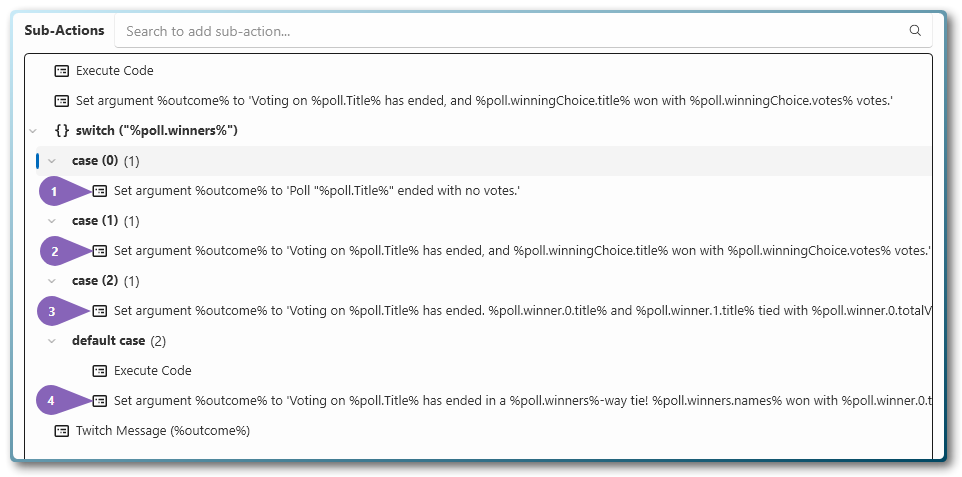
The message can be modified by changing the text in the relevant Set argument %outcome% to ... Streamer.bot action,
shown in the screenshot above. The numbered list below corresponds to the coloured numeric arrows above.
- case (0) will be shown when there are no votes.
- case (1) will be used for a single winning outcome.
- case (2) will be used for a two-way tie.
- default case will be used for three or more winners.
No votes
With zero votes in the poll, there can be no winning poll options. When this happens, a message saying
Poll "[title of the poll]" ended with no votes. will be shown in Twitch chat.
Example
Poll "Best Chocolate Kind" ended with no votes.
Single winning outcome
When one poll entry is the winner, a message will show in chat saying
Voting on [title of the poll] has ended, and [winning option] won with [number of votes] votes..
Example
Voting on Best Chocolate Kind has ended, and Dark chocolate won with 5 votes.
Tie between two outcomes
When a two-way tie between poll items happens, a message will show in chat saying Voting on [title of the poll] has ended. [first poll item] and [second poll item] tied with [number of votes] votes..
Example
Voting on Best Chocolate Kind has ended. White chocolate and Dark chocolate tied with 5 votes.
This wording can be changed however you'd like, to best suit your streams personality.
Tie between three or more outcomes
When a tie between three or more poll items happens, a message will show in chat saying Voting on [title of the poll] has ended in a [winning entries]-way tie! [winning entries] won with[number of votes] votes each..
Example
Voting on Best Chocolate Kind has ended in a 3-way tie! White chocolate, Milk Chocolate and Dark chocolate won with 5 votes each.
This wording can be changed however you'd like, to best suit your streams personality.
Available variables
Along with the default Streamer.bot variables available from the
Poll Complete/Poll Terminated triggers, the following custom variables are available to use within Streamer.bot:
| Name | Variable | Notes |
|---|---|---|
| Number of winning poll entries | %poll.winners% | The number of poll items that had the most number of votes. If no entries had votes, this will be 0. If multiple tied for a win, this will reflect the number of tied entries. |
| The ID of a winning poll entry | %poll.winner.[number].id% | Exists for each winning poll entry, starting from 0. For example, %poll.winner.0.id% |
| The title of a winning poll entry | %poll.winner.[number].title% | Exists for each winning poll entry, starting from 0. For example, %poll.winner.0.title% |
| The number of users who voted | %poll.winner.[number].votes% | Exists for each winning poll entry, starting from 0. For example, %poll.winner.0.votes%. Note, this is the number of users who vote for a particular poll item. If you allow channel point voting, this will still reflect the number of unique people who voted. |
| The amount of channel points spent | %poll.winner.[number].rewardVotes% | Exists for each winning poll entry, starting from 0. For example, %poll.winner.0.rewardVotes%. This is the total number of channel points spent on this poll item, and will be 0 if channel point voting is not enabled. |
| The total number of votes an entry received | %poll.winner.[number].totalVotes% | Exists for each winning poll entry, starting from 0. For example, %poll.winner.0.totalVotes%. This is the total votes received for a poll item, including multiple votes from users who spent channel points to vote, if enabled. |